

Waiter App and
call-waiter system
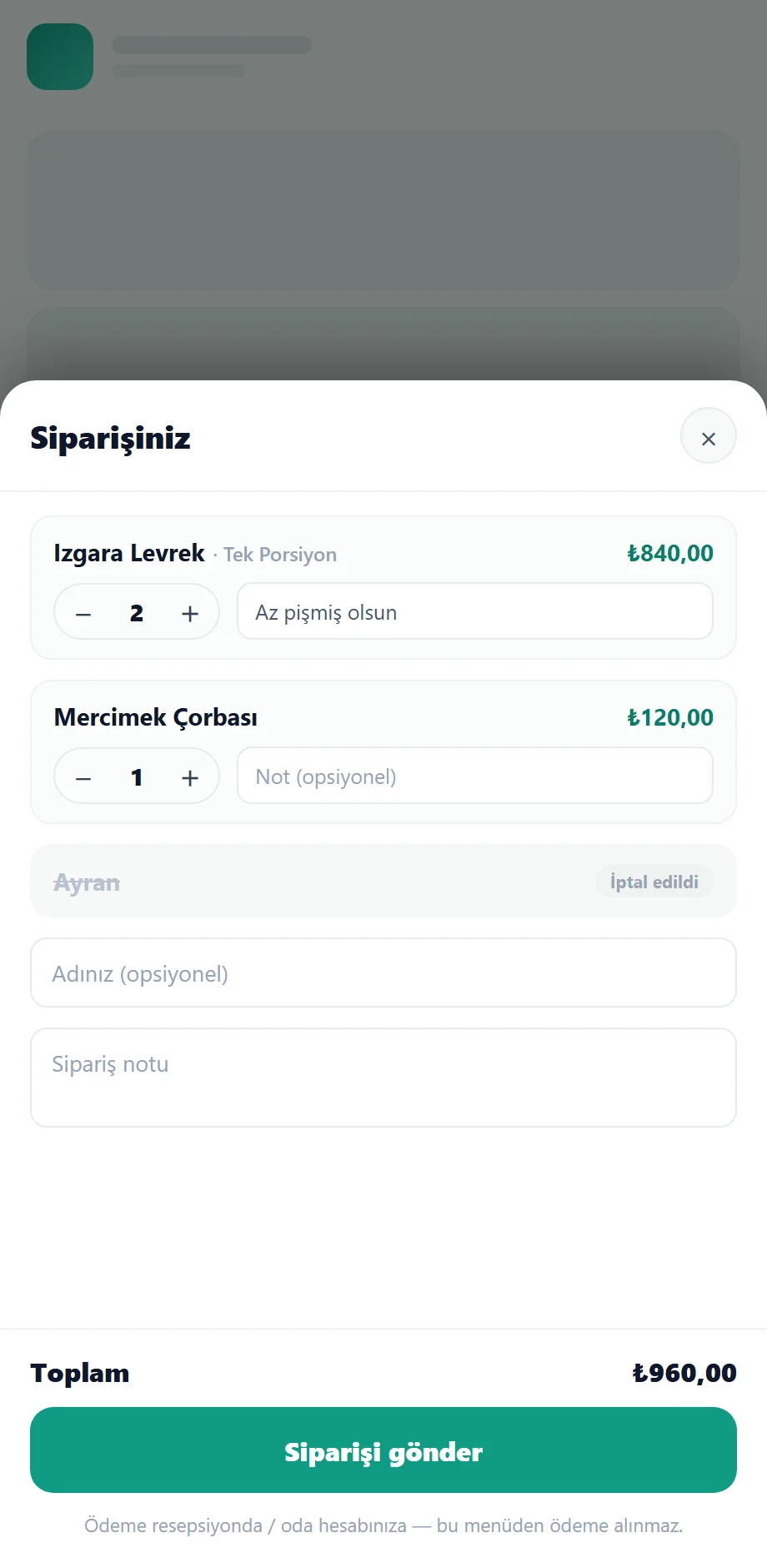
The guest calls a waiter with one tap; the waiter takes the order tableside from a tables screen on their phone. The order drops onto the kitchen/bar printer and onto staff phones at once, and every order at that table joins one running tab. No hardware to buy — the Waiter App installs as a PWA. It is part of Avdena QR Menu.
For hotels, resorts and restaurants
What is the waiter app, and who is it for?
The Avdena Waiter App is the staff side of the Avdena QR Menu module: a login-free app (PWA) where waiters manage tables, orders and guest calls from their phone. It is built for hotels, resorts and restaurants with a restaurant, bar, open buffet, poolside and room service. Guests can self-order from the menu, or ordering can be restricted to waiters only — a per-venue setting.
Login-free PWA
Installs once on the waiter’s phone; no store, no download.
Call waiter
Guests call a waiter to the table with one tap.
One tab
Every order at that table joins a single running tab.
A venue for every point
A Restaurant or Bar for each service point — pool bar, beach bar, room-service bar.
Manage tables and tableside orders from one screen
The waiter sees empty/occupied tables, picks a table and enters the order right at it. A new order arrives as an instant push — even with the page closed — and is managed on the live “Orders” screen.
- Tables screen: empty / occupied state
- Tableside order entry + live push
- Instant table search; per-restaurant assignment and switching
- Real-time screen (WebSocket); food/drink split; partial or full cancel
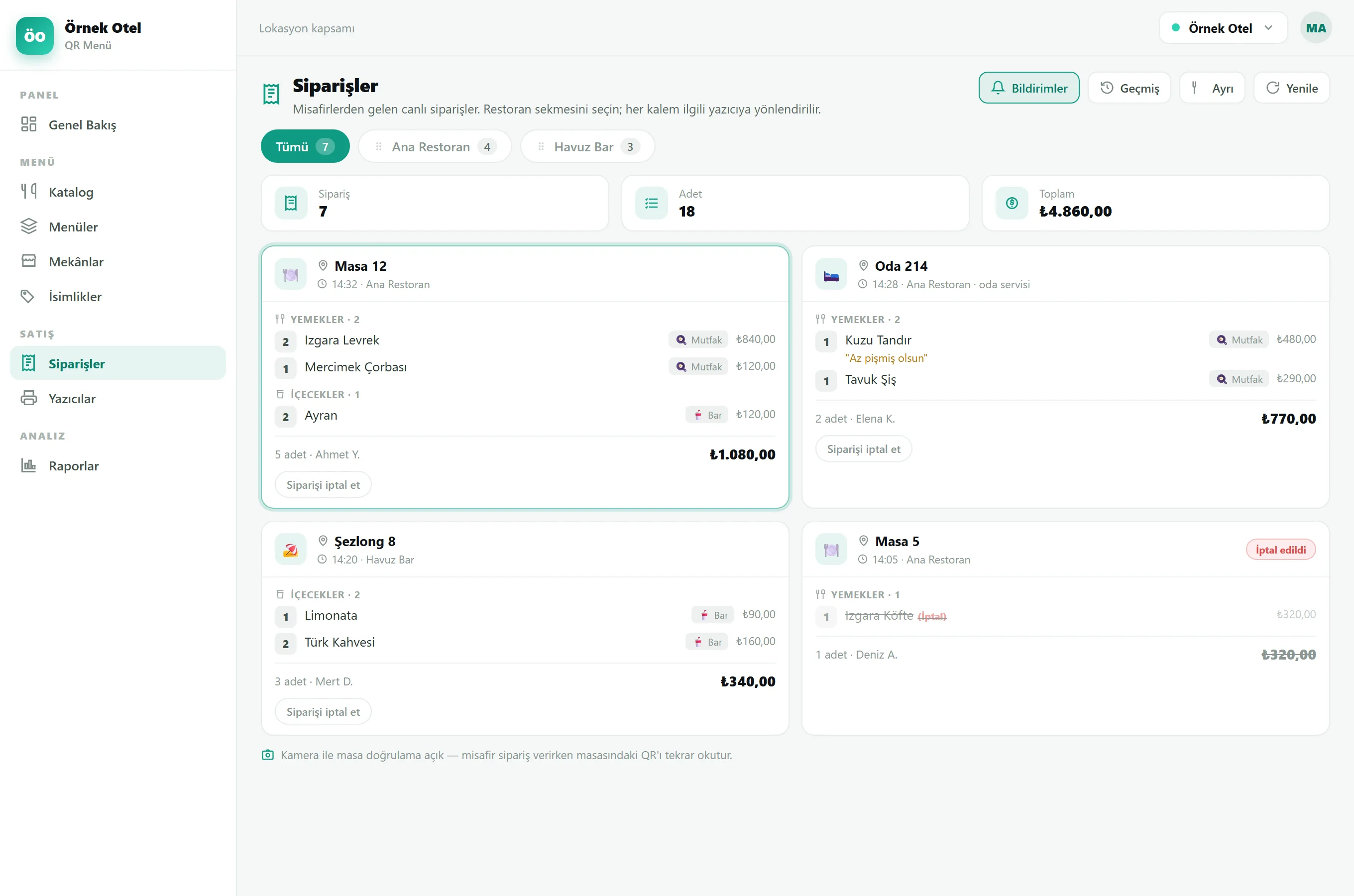
Guests call a waiter with one tap
A guest at the table calls a waiter with one tap from the menu; the call reaches an online waiter assigned to that restaurant and appears on a live calls board. When no waiter is online the button hides automatically — no missed calls.
- The call reaches an assigned, online waiter instantly (60-sec presence)
- Live calls board
- The button hides automatically when no waiter is online
Guests call a waiter with one tap
- The call reaches an assigned, online waiter instantly (60-sec presence)
- Live calls board
- The button hides automatically when no waiter is online
Camera order verification and role-based permissions
The waiter verifies an order by scanning the table QR with the camera (wrong-table warning). Permissions are verb-level: a waiter only takes orders, a chef edits the menu, a manager sees reports — per restaurant.
- Camera QR order verification (wrong-table warning)
- Granular role-based permissions (RBAC): waiter / chef / manager
- Staff management: multi-restaurant assignment, shifts, notification prefs
Camera order verification and role-based permissions
- Camera QR order verification (wrong-table warning)
- Granular role-based permissions (RBAC): waiter / chef / manager
- Staff management: multi-restaurant assignment, shifts, notification prefs
Orders print at the right station, in the right language
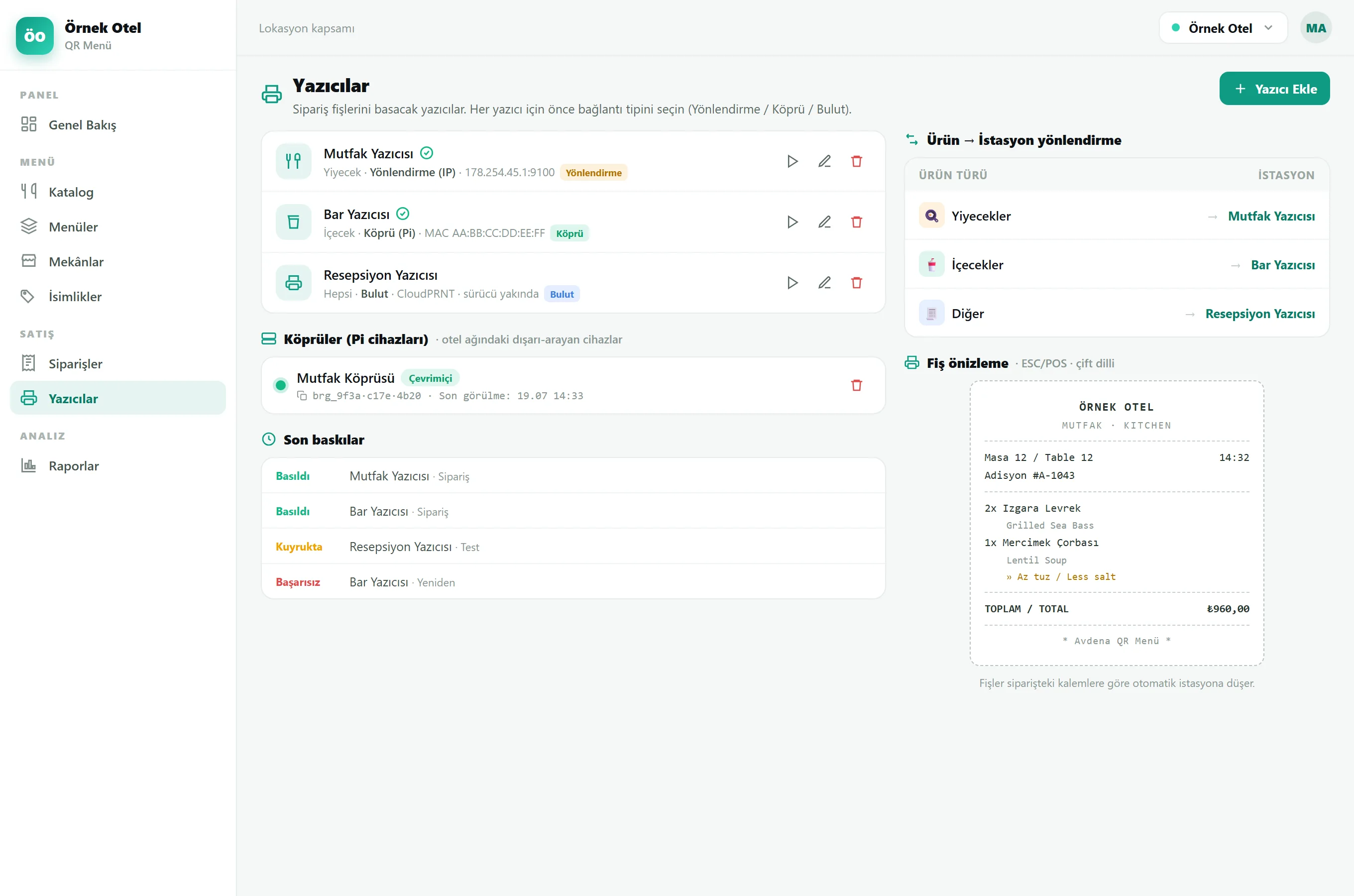
Orders reach paper: drinks to the bar, food to the kitchen. It works with ESC/POS thermal printers in 3 connection modes (local bridge / forwarding / cloud); the ticket prints bilingually and cancellations show clearly in their own section.
- Product → printer routing (kitchen / bar / patisserie)
- Bilingual ticket: product name in local + guest language
- Two-part cancellation ticket
- ESC/POS 3 modes: bridge (Raspberry Pi) / forwarding / cloud
Tableside service in every venue
À la carte restaurant
The waiter takes orders tableside; the kitchen ticket prints instantly.
Bar & poolside
Call a waiter to poolside; drink orders drop to the bar.
Buffet & à la carte
Self-order or waiter-only mode, per venue.
Room service
Room orders on one tab, to the right station.
Tableside service in three steps
The waiter installs the app
A login-free PWA; add it to the phone and pick the restaurant.
The guest calls / orders
A waiter is called to the table, or the guest self-orders.
The order is taken and printed
The waiter enters it tableside; the ticket prints at the right station and joins the tab.
The waiter flow is part of Avdena QR Menu:
Frequently asked questions
The most common questions about the waiter app and call-waiter system.
How does the call-waiter system work?
The guest calls a waiter with one tap from the menu. The call reaches the live calls board of a waiter assigned to that restaurant who is online (in the last 60 sec). When no waiter is online the call button hides automatically.
Does the waiter app need a separate device or hardware?
No. The waiter app is a PWA; the waiter installs it once on their own phone. You do not need to buy a handheld terminal or any hardware.
Is there a tab, and does it take payment?
The flow is payment-free. Every order at that table joins one running tab, visible in the panel and on the waiter screen; payment stays in your existing setup (room account / till / reception).
Should guests order, or waiters take the order?
Both are possible — it is a per-venue setting. You can let guests self-order or restrict ordering to waiters only. The same menu, two flows.
How does it prevent orders on the wrong table?
The waiter verifies the order by scanning the table QR with the camera; it warns for a different table.
Can I let a waiter only take orders, not edit the menu?
Yes. Permissions are verb-level and granted per restaurant: a waiter only takes orders, a chef edits the menu, a manager sees reports. A user without a permission never even sees that screen.
Which printer does the order go to?
With product → station routing, drinks print at the bar and food in the kitchen. ESC/POS thermal printers are supported in 3 modes: local bridge (Raspberry Pi), forwarding and cloud. The ticket is bilingual.
Is the Waiter App a separate product?
It is the staff side of the Avdena QR Menu module; it comes with QR Menu. Menu, ordering and the waiter flow are managed from one panel.
Let’s digitise your waiter flow today
Call waiter, a tables screen and tableside ordering — with no hardware. We handle the setup with your brand and your menu.
Faults and requests are answered by e-mail.